Kiosk browser for iPad and iPhoneThe iPad that
runs itself.

Set it out and walk away. Glassfront keeps one website in front, starts fresh for every visitor and comes back by itself after a network drop.

Coming to the App Store in November 2026 · Free to set up and test, with a Glassfront bar on the kiosk screen · $29.99 once per device removes it

  • 14:12 Wi-Fi lost. Back in 8 seconds.
  • 16:40 Idle 2 minutes. Fresh start.
  • 03:00 Nightly reload finished.
  • 3 steps from download to a locked kiosk
  • 7 readiness checks before you leave the room
  • 0 accounts, servers or trackers
  • $29.99 one-time unlock, per device

A day on its own

What happens when nobody is watching

Follow one iPad through a day in a museum. Every moment below is something Glassfront handles without you.
  1. Doors open

    Your page. Nothing else.

    No address bar, no tabs, no way out to the rest of the web. The iPad shows the one site you chose, full screen.

  2. A curious tap

    Links that leave stay closed.

    A visitor taps a link to somewhere else. A short notice appears, and the screen stays on your site.

  3. The Wi-Fi drops

    It waits, then carries on.

    Visitors see a calm message, not a browser error. Glassfront keeps trying and brings your page back by itself.

  4. Someone walks away

    The next visitor gets a fresh start.

    After two minutes without a touch the screen asks, then returns to the first page. Cookies, history and form fields are cleared.

  5. Nobody is there

    It looks after itself overnight.

    A nightly reload keeps the page fresh, and the screen can dim on a schedule.

  6. You walk in

    One look tells you it is ready.

    Seven checks, each with a green mark or the one thing to fix, and a log of what happened while you were away. No visitor data in it.
Break it yourself in the live demo

Set up

Two minutes to set up.
Seconds to copy.

Three steps and a readiness check. Then the next iPad scans a QR code.

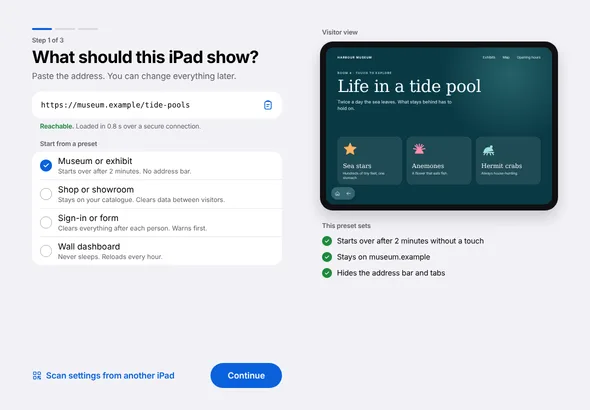
  • Paste the address. Pick a preset. Lock the iPad.

    The preview shows what visitors will get before you leave the room.

    First run, step 1 of 3: a field for the website address, a list of presets, and a preview of the visitor screen
  • Nothing collected

    No account, no server of ours, no analytics. The log stays on the iPad and holds no visitor data.

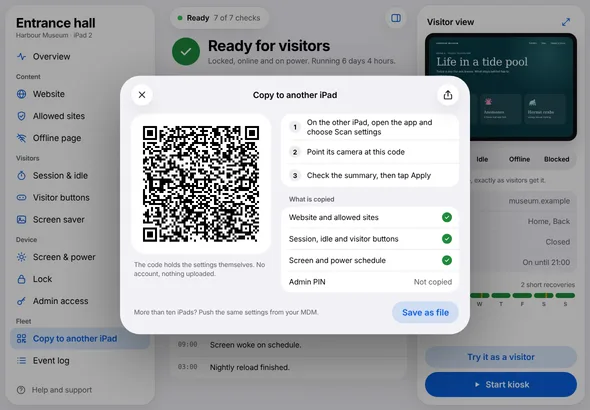
  • The next iPad scans a QR code

    The code holds the settings themselves. Nothing is uploaded.

    Copy to another iPad: a QR code, three steps, and a list of what is copied
  • Five presets do the tuning

    Each one sets the timers, gestures and visitor buttons for its job.

    • Museum or exhibit
    • Menu or catalog
    • Sign-in or form
    • Wall dashboard
    • Display only
  • iPhone too

    The same app and the same features, in a layout for the narrow screen.

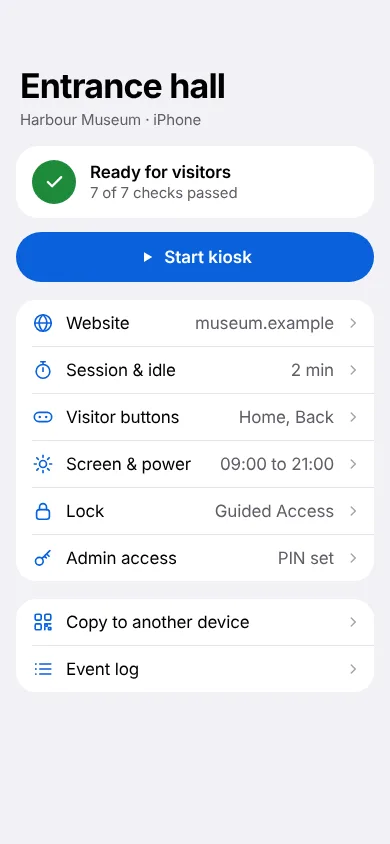
    Overview on iPhone: Ready for visitors, a Start kiosk button and the list of settings
  • Ready for visitors, at a glance

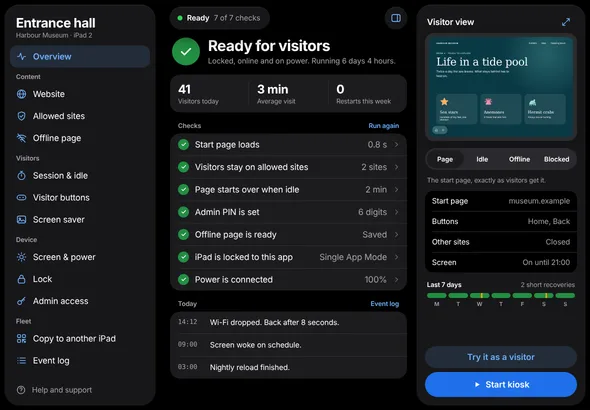
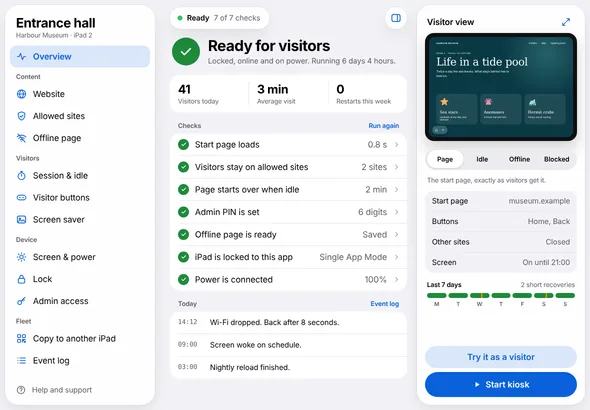
    Seven checks, today's events and the last seven days. In light and dark.

    Overview screen in dark mode: Ready for visitors, seven checks with green marks, today's events and a strip for the last seven days
  • Works without Wi-Fi

    Put your pages on the iPad as an offline bundle and the kiosk needs no network at all.

Screens show the design of version 1.0, unlocked. The free edition adds a Glassfront bar at the bottom of the kiosk screen.

Why Glassfront

Built for the screen
nobody is watching

Guided Access locks an iPad into an app. It does not make Safari a kiosk. Glassfront does, with no account and no server of ours.

GlassfrontGuided Access with SafariA typical subscription kiosk service
One website, full screenYesAddress bar and tabs stayYes
Fresh start for every visitorYes, with session data clearedNoUsually
Recovers from network dropsYes, by itselfShows a browser errorVaries
Copy the setup to the next iPadQR code, no serverBy handThrough their server
AccountNoneNoneUsually required
PriceFree with a Glassfront bar, or $29.99 once per deviceFreeMonthly or yearly, per device

Use cases

Pick the place

Each page shows the preset to start from and what visitors see.

Questions

Before you set one up

What is a kiosk browser?

An app that shows one website full screen, with no address bar and no tabs, on a device that stands in a public place. Glassfront does this on iPad and iPhone, starts over after each visitor and recovers by itself when the network drops.

How do I put an iPad in kiosk mode?

iPadOS has no switch called kiosk mode. You combine two things: a kiosk app that shows your website full screen, and Guided Access or Single App Mode, which keeps the iPad in that app. Glassfront is the kiosk app, and its setup walks you through the lock.

Will it work with my website?

Glassfront shows pages with the web engine built into iPadOS, the one Safari uses. The sure way to know is free: install the app, paste your address and look at the preview before you pay anything. Glassfront does not connect to printers, scanners or card readers.

How do I lock an iPad to one website?

Install Glassfront, paste the address of your site and pick a preset. Then turn on Guided Access, or Single App Mode if your iPads are managed, so the iPad stays in the app. The setup shows each step and ends with a readiness check.

Do I still need Guided Access?

Yes. Glassfront holds the website; Guided Access or Single App Mode holds the iPad in the app. Both are part of iPadOS and free.

Does it work without Wi-Fi?

Yes. Put your pages on the iPad as an offline bundle, a folder or a ZIP file, and the kiosk runs with no network at all.

What does it cost?

The download is free and every feature works. The free edition shows a "Glassfront · free edition" bar along the bottom of the kiosk screen. A one-time purchase of $29.99 per device removes it, and your page fills the screen. Organizations that manage iPads will be able to buy a yearly license per iPad instead.

What data does it collect?

None. The app has no account, no analytics and no server of ours. The event log stays on the iPad and holds no visitor data.

Which devices does it run on?

iPad with iPadOS 16 or later and iPhone with iOS 16 or later. It is one app with the same features on both.

More on pricing, in support, and in the guide to locking an iPad to one website.

Coming to the App Store in November 2026

Try everything first.
Then your screen, edge to edge.

The free edition is the whole app, for setting up and testing. It shows a "Glassfront · free edition" bar along the bottom of the kiosk screen. One purchase of $29.99 per device removes it, and your page fills the screen. Same features in both editions. No account.